
OpenAI recently introduced Businesses in ChatGPT, allowing your dealership to claim its official page. Once verified, you get a blue checkmark, access to live product and vehicle inventory feeds, your own custom Business Agent, and clear insights into search analytics.
With more buyers searching via conversational AI every day, setting up your profile ensures ChatGPT shares the right business details, up-to-date inventory, and correct pricing.
At sMedia, we’ve seen the challenges businesses face when they don’t get their business profiles or Facebook page control right from the start. We put together this quick guide to help you through the process of claiming your business on ChatGPT.
Why You Should Claim Your ChatGPT Profile
Earn a blue checkmark so shoppers know they are dealing directly with your business and can trust the information in ChatGPT.
Build your own ChatGPT Business Agent inside the chat window to assist shoppers as they browse.
Track popular topics to see exactly what potential customers are asking about your business.
Protect your brand presence by directing AI search traffic straight to you, not third-party listings.
Pre-Claim Checklist:
Gather these items before starting your profile verification:
Use a primary work email tied to a business owner or key administrator.
Provide main company phone numbers, not temporary lines or third-party vendor routing numbers.
Confirm you or your website manager can update your domain's DNS settings.
Step-by-Step Profile Setup Guide
Head over to OpenAI Business in ChatGPT and search for your organization.
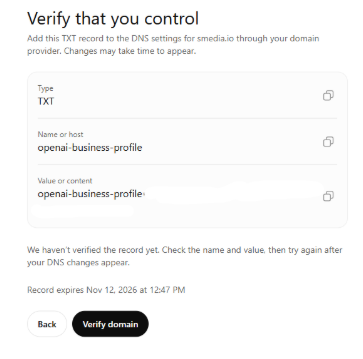
Verify Your Domain via TXT Record:
Copy the Type (TXT), Name/Host (for instance, openai-business-profile), and Value/Content shown on your verification screen.
Paste the TXT record into your DNS records using your domain provider, or send those details over to your web team.
Select Verify Domain after updating the record.
Complete Your Profile & Product Feeds:
Fill in official contact info, business location, operating hours, and phone numbers.
Optional: Connect your live product feeds and activate your custom Business Agent.
Think of your ChatGPT profile as an active marketing channel. Check your search analytics regularly, keep inventory feeds updated, and work alongside your team to turn incoming AI search leads into steady customers.
Frequently Asked Questions
Who is eligible to claim a profile? Verified business owners, designated administrators, and marketing leads with administrative access to the primary company domain can complete verification.
What are the key benefits and trade-offs? You get a verified blue checkmark, your own custom Business Agent, and search analytics. That said, OpenAI generates recommendations independently, so claiming your page will not guarantee higher rankings or immediate sales boosts.
Will claiming a profile boost search ranking? No, claiming your profile does not automatically improve overall search visibility. Its primary purpose is to keep your business information accurate and give you insights into search queries.
Are automotive vehicle inventory feeds supported? Direct automotive vehicle feeds are not currently available through OpenAI. Existing integrations target e-commerce platforms like Shopify, meaning dedicated auto inventory options are still pending release.
How long does DNS verification take? Most DNS updates process in a few minutes, though full propagation across specific host providers can take between 24 and 48 hours.
Can multiple team members manage a profile? Yes, primary administrators can invite team members via their ChatGPT accounts after completing domain verification.
